All Those Smart Gadgets Are Quietly Eating Your WiFi Alive
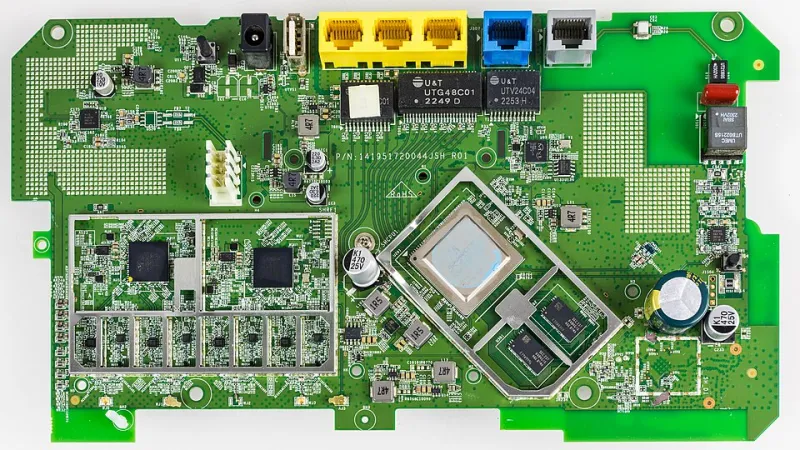
Photo: Raimond Spekking, CC BY-SA 4.0, via Wikimedia Commons
You upgraded your internet plan. You moved your router to a better spot. You even rebooted the thing more times than you'd like to admit. And yet, your WiFi still feels sluggish when it matters most — during a video call, a Netflix binge, or a competitive online gaming session.
Here's something a lot of people miss: it might not be your connection at all. It might be the 30-odd smart devices silently running in the background, all competing for the same slice of bandwidth.
Welcome to the smart home WiFi trap.
The Hidden Cost of a "Connected" Home
A few years ago, the average American household had maybe five or six devices on the WiFi — a couple of laptops, some phones, maybe a tablet. Today? The average US home has somewhere around 20 connected devices, and that number keeps climbing.
Think about everything you've added over the past couple of years: a smart thermostat, a video doorbell, a robot vacuum with an app, smart light bulbs, a connected refrigerator, a baby monitor, a streaming stick on every TV, a voice assistant on the kitchen counter. Each one of those gadgets is doing something on your network, even when you're not actively using it.
The issue isn't just raw bandwidth consumption — though that's a real factor. It's the constant, low-level chatter. Smart devices ping their cloud servers, check for firmware updates, send telemetry data, and stay "awake" on your network around the clock. Individually, none of this is a huge deal. Collectively, it creates what network engineers call "background noise," and it can seriously degrade the quality of your connection for the things you actually care about.
Spotting the Bandwidth Hogs in Your Home
Before you can fix the problem, you need to know where the problem is coming from. Not all smart devices are created equal — some are much worse offenders than others.
Video-based devices are the biggest culprits. Security cameras and video doorbells are notorious bandwidth consumers, especially if they're set to record in high definition or stream footage continuously to cloud storage. A single 1080p security camera can use anywhere from 1 to 4 Mbps in continuous streaming mode. Multiply that by four or five cameras and you've got a significant chunk of your connection spoken for before anyone even opens a browser.
Smart TVs and streaming devices are another major factor, even when nobody's watching. These devices regularly download app updates, refresh content libraries, and sometimes run background processes that chew through data.
Smart speakers and voice assistants tend to be lighter on bandwidth individually, but they're always listening and always connected, adding to that background chatter.
To actually see what's happening on your network, log into your router's admin panel (usually accessible at 192.168.1.1 or 192.168.0.1 in your browser). Many modern routers — especially those from brands like ASUS, Netgear, and TP-Link — have built-in traffic monitoring dashboards that show you which devices are using the most bandwidth in real time. If your router doesn't have this feature, apps like Fing or GlassWire can give you a clear picture of your network activity.
Why Device Count Matters as Much as Speed
Here's something your ISP won't advertise: the number of devices on your network affects performance in ways that a faster internet plan can't always fix.
Your router has to manage every single connection simultaneously. The more devices actively communicating, the more your router has to juggle — and every router has its limits. Older routers, in particular, can get overwhelmed by the sheer volume of connection requests, causing latency to spike even when your actual download speeds look fine on paper.
This is partly why WiFi 6 routers became such a big deal for smart home users. The standard introduced a technology called OFDMA (Orthogonal Frequency Division Multiple Access) — a fancy way of saying the router can talk to multiple devices at once more efficiently, rather than bouncing between them one at a time. If you're running a house full of smart gadgets on an older router, this upgrade alone can make a noticeable difference.
Practical Strategies to Reclaim Your Network
Create a dedicated IoT network. Most modern routers let you set up a guest network or a separate SSID (network name). Put all your smart home devices on this secondary network and keep your laptops, phones, and streaming devices on the primary one. This does two things: it limits how much your smart gadgets can interfere with your main devices, and it adds a layer of security by keeping potentially vulnerable IoT devices isolated.
Use Quality of Service (QoS) settings. QoS is a router feature that lets you prioritize specific devices or types of traffic. You can tell your router, in effect, "my work laptop and gaming console come first — everything else gets whatever's left over." This won't magically create more bandwidth, but it ensures the bandwidth you have goes where it matters most. Check your router's settings menu — most modern routers have QoS options under "Advanced" settings.
Audit your camera settings. If you have security cameras, dial back the resolution or reduce continuous streaming to motion-triggered clips only. Going from 4K to 1080p on a doorbell camera makes almost no visible difference in real-world footage, but it can cut your bandwidth usage dramatically.
Schedule updates for off-peak hours. Many smart devices let you control when they check for updates. Push those windows to the middle of the night — 2 or 3 a.m. — so firmware downloads and app refreshes aren't competing with your daytime usage.
Prune devices you don't actually use. Take a walk through your router's connected device list and be honest with yourself. That smart plug you set up two years ago and never use? The old tablet running a home automation app you abandoned? Disconnect them. Every device you remove is one less thing pulling on your network.
Your Network Is Only as Strong as How You Manage It
A smart home is genuinely convenient — nobody's arguing against the appeal of a doorbell that texts you when a package arrives or a thermostat that learns your schedule. But convenience comes with trade-offs, and one of the biggest is what it does to your WiFi.
The good news is that most of these issues are totally manageable once you know what you're dealing with. You don't necessarily need to spend money on a new router or a faster internet plan. Sometimes you just need to take a hard look at what's running on your network and make a few smart adjustments.
Your signal is yours. Don't let a fleet of gadgets take it from you.