Shiny New Router, Same Old Slow Internet: Why WiFi 7 Can't Fix Your ISP Problem
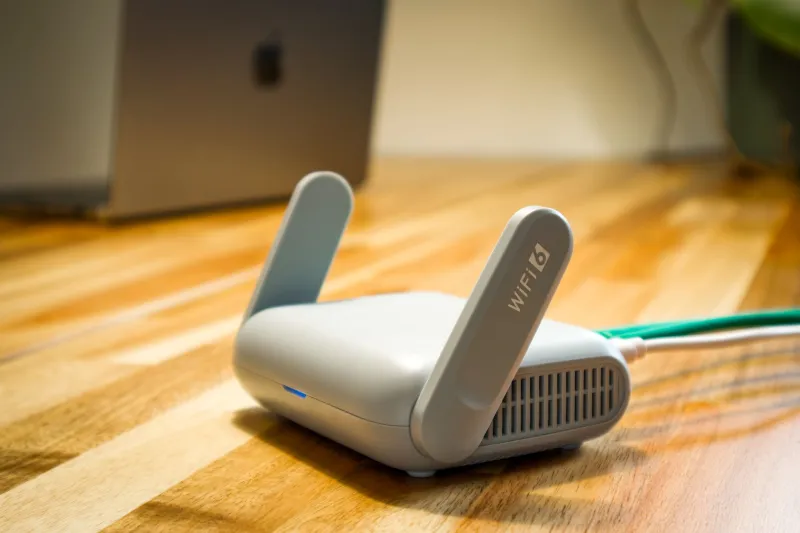
Walk into any Best Buy right now and you'll find WiFi 7 routers stacked on shelves like they're the answer to every network prayer you've ever had. The marketing copy is irresistible — multi-link operation, 320 MHz channels, theoretical speeds that sound like science fiction. It's hard not to get excited.
But here's the thing nobody in that store is going to tell you: if your internet service plan is capped at 300 or 400 Mbps, upgrading to a WiFi 7 router is roughly equivalent to buying a Ferrari to sit in rush hour traffic on the 405. The engine is incredible. The road doesn't care.
Let's talk about why that is — and how to figure out whether a next-gen router upgrade actually makes sense for your specific situation.
The Pipe vs. The Faucet Problem
Think of your internet connection like water coming into your house. Your ISP controls the main pipe — the total volume of water that can flow in from the street. Your router is the faucet system inside. A better faucet setup can absolutely improve how that water gets distributed to different rooms, but it cannot make more water come through the pipe than your utility company allows.
WiFi 7 is an exceptional faucet system. It's faster, smarter, and more efficient at distributing signal across your devices. But if Comcast, AT&T, Spectrum, or whoever your provider is has you on a plan that delivers 300 Mbps downstream, that's the hard ceiling on your internet speeds — full stop. No router on the market changes that number.
This distinction matters a lot when you're staring down a $500 router purchase.
What WiFi 7 Actually Improves (And What It Doesn't)
To be fair, a WiFi 7 router isn't completely pointless even on a slower ISP plan. There are real benefits worth acknowledging:
Local network transfers — Moving files between devices on your home network (say, from a NAS drive to your laptop) can genuinely benefit from faster WiFi standards, because those transfers never touch your ISP's pipe at all.
Reduced congestion in busy households — WiFi 7's multi-link operation lets devices connect across multiple bands simultaneously, which helps when a dozen devices are competing for airtime.
Lower latency — For gaming and video calls, WiFi 7 can reduce lag on your local connection, though your ISP's network latency is a separate variable entirely.
Future-proofing — If you're planning to upgrade your internet plan to a multi-gig tier in the next year or two, buying WiFi 7 now means you won't need to replace the router later.
That said, none of those benefits are worth $400–$600 if your primary frustration is that Netflix buffers or your Zoom calls drop. Those are ISP problems, not router problems.
The Quick Math: Does Your Plan Justify the Hardware?
Here's a simple framework to figure out whether a router upgrade actually aligns with your internet plan. Pull up your ISP account and find your subscribed download speed, then run it through this rough guide:
Under 200 Mbps: Almost any modern router — including budget WiFi 5 or WiFi 6 models from $60 to $120 — can handle this without breaking a sweat. Spending more than $150 on a router at this tier is hard to justify on speed grounds alone.
200–500 Mbps: A solid WiFi 6 router in the $100–$200 range is the sweet spot here. You'll get full throughput to your devices without overpaying. WiFi 7 at this tier is overkill unless you have a very specific use case like dense device environments or heavy local file transfers.
500 Mbps–1 Gbps (Gigabit): This is where WiFi 6E starts making real sense, and entry-level WiFi 7 routers become worth considering — especially if multiple people in your home are streaming 4K, gaming, and on video calls simultaneously. Budget $150–$300.
1 Gbps–2.5 Gbps (Multi-Gig): Now you're in WiFi 7 territory. To actually push those speeds wirelessly to your devices, you need the bandwidth capacity and channel width that WiFi 7 provides. Spending $300–$600 on a router here is genuinely defensible.
2.5 Gbps and above: If your ISP has you on a premium multi-gig fiber plan, congratulations — you're one of the few people who will actually notice the difference a flagship WiFi 7 router makes. Go for it.
The honest takeaway: most American households are still on plans between 200 Mbps and 1 Gbps. That's a range where WiFi 6 hardware handles the load comfortably and WiFi 7 is mostly buying headroom you haven't grown into yet.
Check Your Actual Speeds Before You Do Anything
Before you make any hardware decision, do yourself a favor and run a speed test — not once, but a few times throughout the day. Use a site like Speedtest.net or Fast.com, and run it both over WiFi and plugged directly into your modem via ethernet cable.
That wired test is the important one. It tells you what your ISP is actually delivering to your home, independent of your router entirely. If your plan promises 500 Mbps and your wired test shows 480 Mbps, your ISP is doing its job. If you're getting 150 Mbps on a 500 Mbps plan, that's a conversation to have with your provider — and no router upgrade will fix it.
If the wired speed looks healthy but your WiFi speeds are significantly lower, that's when your router becomes the bottleneck and an upgrade might genuinely help.
The ISP Upgrade Conversation Worth Having First
Here's an angle a lot of people skip entirely: before spending money on new hardware, call your ISP and ask about your current plan options. In many markets — especially where fiber providers like Google Fiber, Frontier Fiber, or local municipal networks have entered — competition has pushed prices down significantly. You might be able to double your speed tier for the same monthly rate, or add a gig plan for $10–$20 more per month.
Getting a faster internet plan often delivers more real-world improvement than swapping out a router, and it costs less upfront. It's not glamorous advice, but it's the honest one.
So Should You Buy a WiFi 7 Router?
Maybe — but only after you've done the homework. Know your ISP plan speed. Run a wired speed test to confirm you're actually getting what you pay for. Identify whether your current router is the actual bottleneck or just a convenient scapegoat.
If your plan tops out at 300 Mbps and your existing router is a few years old but reasonably modern, the single best investment you can make is a conversation with your ISP — not a trip to the router aisle.
WiFi 7 is genuinely impressive technology. It'll matter more and more as internet plans scale up and device counts in homes keep climbing. But right now, for most people on average US internet plans, it's hardware waiting for infrastructure to catch up. Spend smart, know your ceiling, and let your actual usage — not the box art — drive the decision.